Purpose
Update SAP data via the OData interface
Common SAP entities support updates via the OData interface. Unlike direct database updates, which could compromise the integrity of the SAP database and are therefore not an option for external applications, SAP's released OData APIs are designed to apply the same business logic as the standard transactions:
- Authorization checks
- Object integrity rules
- Updates to dependent data
- Locking rules
At first glance, the update seems quite simple; for example, you can set the requested delivery date of a sales order to a specific date as follows:
// create structure with the fields to be modified
CreateStructure V[SalesOrderUpd] RequestedDeliveryDate

// set new value
Set V[SalesOrderUpd.RequestedDeliveryDate] _
   "10/20/2026"

// update sales order 4416
CallVB guinet.odata.update _
  service:="sap/opu/odata/sap/" && _
     "API_SALES_ORDER_SRV/A_SalesOrder('4416')" _
  values:="SalesOrderUpd"
However, there are several aspects to consider when you implement an OData update:
- Field formatting
Date formats, decimal point or comma, and leading zeros in key values are common problems. The GuiXT OData API provides a solid basis for getting the field formats right. - Updatable fields
The SAP service metadata only describes whether a property is updatable in general, and this information is not always reliable: a property may be declared updatable but rejected by the backend for certain records. For example, the complete delivery indicator of a sales order (CompleteDeliveryIsDefined) can no longer be changed once deliveries exist for the order, although the metadata does not indicate this restriction. - Required fields
If you change an amount, for example, it can be necessary to provide the currency field as well. - Warnings
Warnings are returned only together with the success response, after the data has already been saved. The user can no longer decide against saving. Recommendation: If a business rule must be confirmed before saving, implement the check in your application before sending the update. - Error messages
Error messages are often technically worded and may refer to internal field names rather than to the OData property names. For example, a rejected change of CompleteDeliveryIsDefined results in a message about the field COMPLETE_DELIVERY_IND. Assigning a message to the corresponding input field in your user interface is therefore not always possible. Recommendation: Translate internal field names into the labels used in your application. - Concurrent updates
SAP OData uses optimistic concurrency control via ETags instead of traditional persistent enqueue/dequeue locks. ETags are supported in the GuiXT OData API. - Asynchronous update processing
SAP often saves changes in an asynchronous update task. A read request issued immediately after a successful update may therefore still return the previous data, typically for a few seconds. Recommendation: Do not assume that the data read directly after an update reflects the change.
In some cases, performing the update via a GuiXT InputScript, that is, by automating the SAP standard transaction, can be a good alternative: for example, if no released update service exists for the object, or if the user needs to confirm warnings before the data is saved.
In the following, we will examine these critical aspects in more detail using the sample application below. You can find all the scripts for the sample application in the link at the end of the article.
Sample application
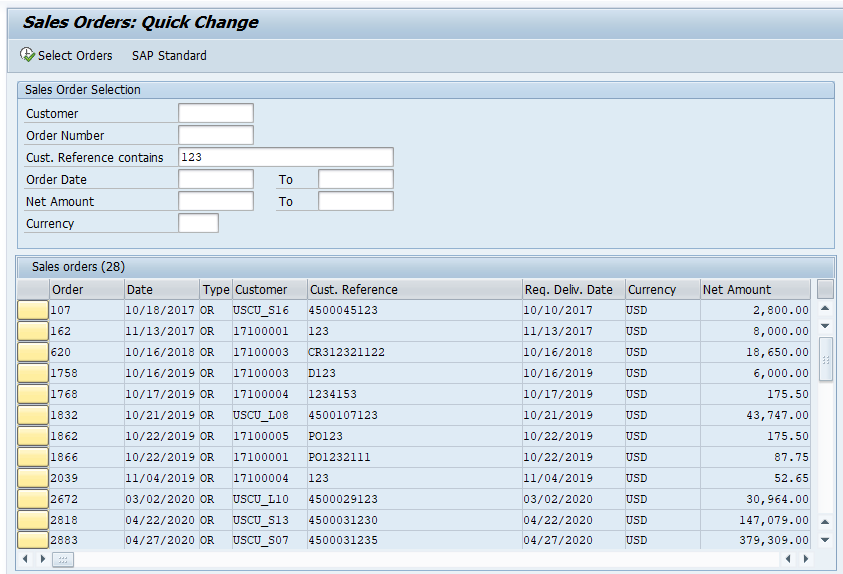
Our sample application is a typical master-detail application that can serve as a blueprint for your own applications.
The upper part of the screen displays a list of sales orders retrieved according to various selection criteria:
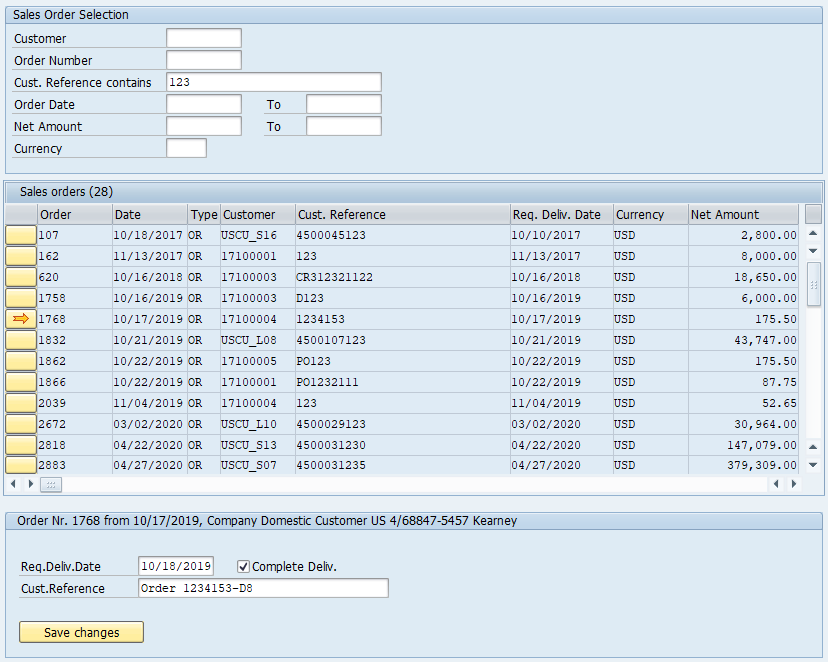
When you select a row, a detail pane opens in which you can modify certain fields of the sales order:
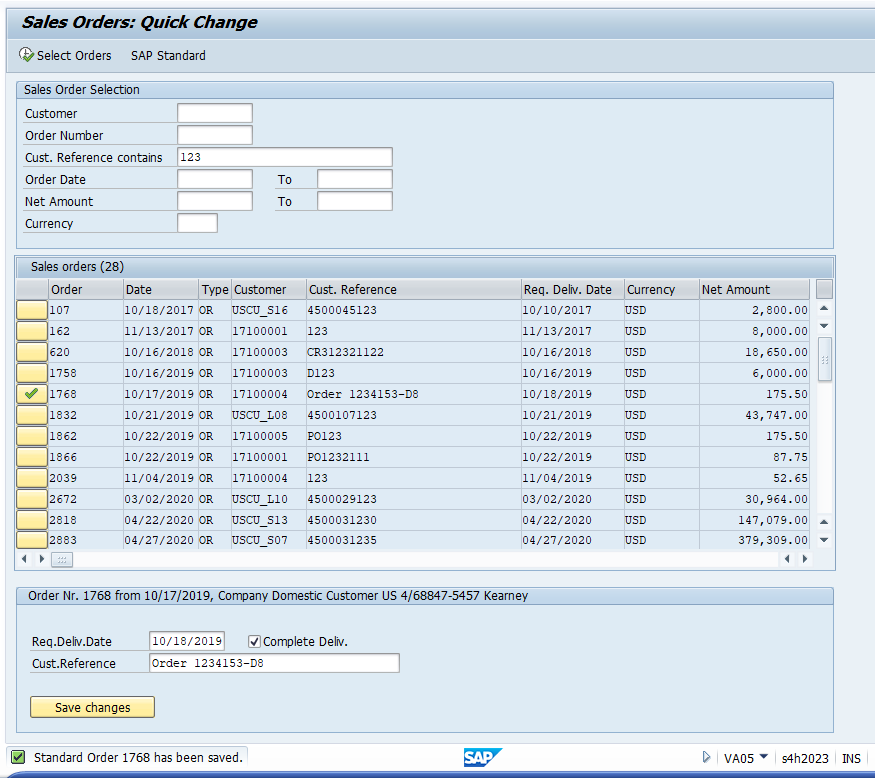
After you click "Save", the modified row is highlighted and the changes are reflected in the list:
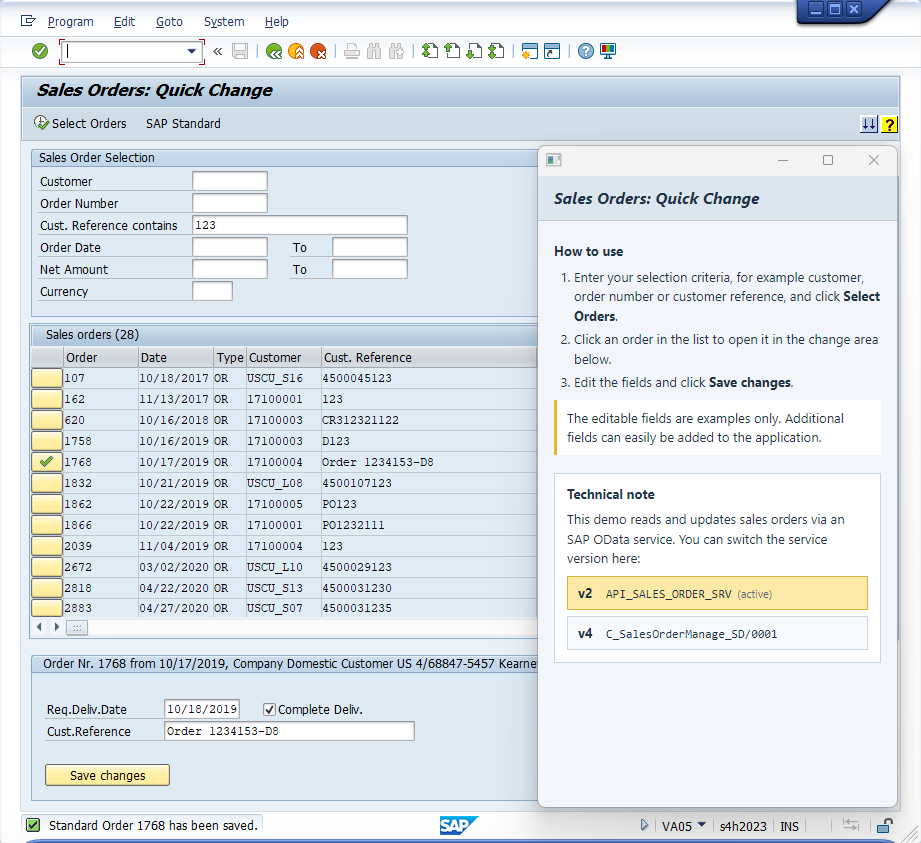
For demonstration purposes, you can use the Help icon to switch between an OData v2 service and an OData v4 service. The GuiXT scripts then use the corresponding service name in their OData calls.
No further changes are needed, since the GuiXT OData API layer handles the formal differences between OData v2 and v4.
Field formatting
In GuiXT, all variables are simply strings; whether a string is interpreted as a number or a date depends solely on the context.
The OData standard, in contrast, defines a set of data types and specifies how they are represented in the protocol.
For example, OData v2 uses the data type Edm.DateTime for dates. In OData JSON, a date is represented as milliseconds since January 1, 1970,
e.g. "PurchaseDate": "/Date(1797379200000)/". In a v2 filter condition, the same date would be written as
PurchaseDate eq datetime'2026-12-16T00:00:00'.
OData v4 adds Edm.Date, which expresses a pure calendar date (format YYYY-MM-DD) without a time component or timezone offset.
An SAP v4 service therefore returns the same date as "PurchaseDate": "2026-12-16" and expects it in a filter condition as
PurchaseDate eq 2026-12-16 (without quotes).
The GuiXT OData API handles these differences, but it needs to know that a field contains a date.
In principle, this information is available in the metadata of the OData service; for performance reasons, however, GuiXT does not read the metadata.
You therefore need to tell the GuiXT OData API explicitly which fields are to be interpreted as dates rather than strings.
GuiXT then converts these values in both directions: from the user-specific date format, e.g. 16.12.2026 or 12/16/2026,
into the correct v2 or v4 format, and from the OData format back into the user format.
The same applies to decimal numbers: OData always uses a period as the decimal separator, whereas in the SAP GUI the decimal separator
can be configured by the user. Boolean values are represented as true and false in OData, and as "X" and "" in GuiXT.
You can specify the OData type either in the CreateStructure and CreateTable statements (recommanded, and generated in this way by the ODataTool in the GuiXT Script Editor Pro), or in the OData call:
Updating the delivery date of a sales order, type annotation in CreateStructure
CreateStructure V[SalesOrderUpd] _
  PurchaseOrderByCustomer  _
  RequestedDeliveryDate(Date) _
  CompleteDeliveryIsDefined(Boolean)

// update sales order
CallVB guinet.odata.update _
  service:=... _
  values:="SalesOrderUpd"
Updating the delivery date of a sales order, type option in the OData Call
CreateStructure V[SalesOrderUpd] _
  PurchaseOrderByCustomer  _
  RequestedDeliveryDate  _
  CompleteDeliveryIsDefined

// update sales order
CallVB guinet.odata.update _
  service:=... _
  values:="SalesOrderUpd" _
  options:="-isDate.RequestedDeliveryDate," && _
           "-isBoolean.CompleteDeliveryIsDefined"
Both approaches ensures correct conversion, so you can define the input fields in your GuiXT script as usual:
Input fields for date and checkbox
InputField (2,3) "Req.Deliv.Date" (2,20) -date _
  name="SalesOrder.RequestedDeliveryDate"
CheckBox (2,34) "Complete Deliv." _
  name="SalesOrder.CompleteDeliveryIsDefined"
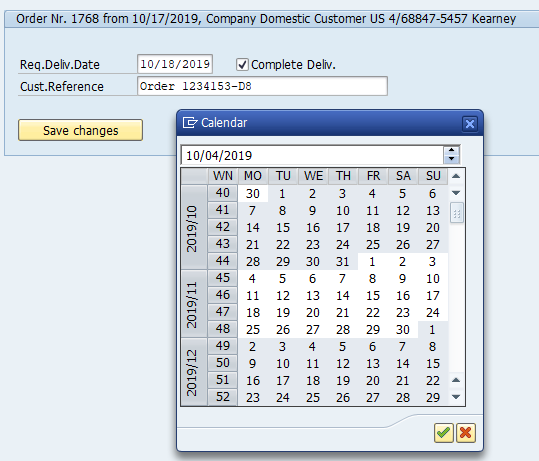
Users can then pick the date with the standard SAP calendar control:
Updatable fields
Which fields can actually be changed depends on the business object. In a sales order, for example, you cannot change the division
afterwards, neither in VA02 nor via the OData service.
The v2 and v4 services behave slightly differently here. The v2 service does not return an error message, but silently leaves the field unchanged:
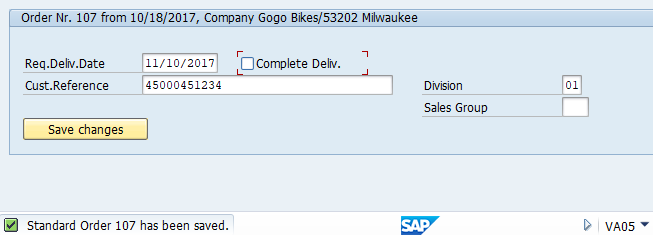
So it is advisable to read the entity again after an update if you need to verify the result.
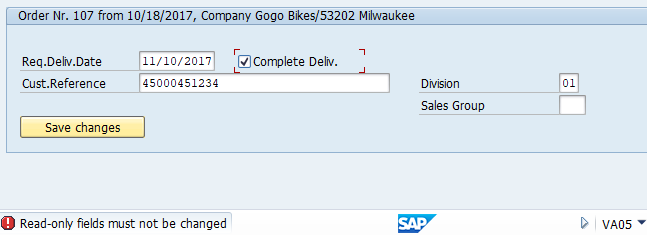
The v4 service is more precise and returns the error message "Read-only fields must not be changed":
Whether a field can be changed may depend on the status of the object in the SAP system. There can also be dependencies between the fields
being changed, as the following example shows.
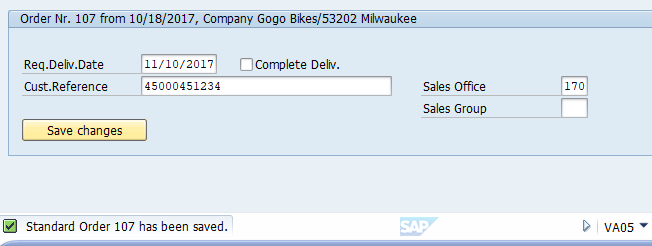
We add "Sales Office" and "Sales Group" as input fields and enter the sales office "170". This works:
If we do the same with "Sales Group" while leaving "Sales Office" empty, we get the error message "Enter a sales office for the sales group":
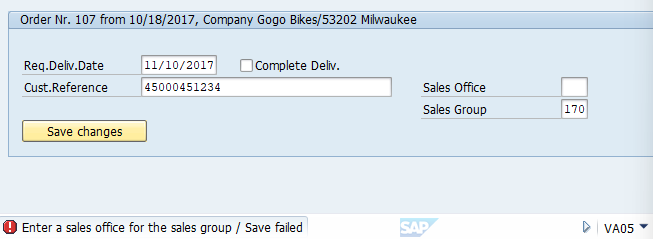
Required fields
Required fields are mainly relevant when creating a new object; for an update, we can generally assume that all necessary fields are already set.
However, a field may become mandatory as soon as another field has been given a value. As an example, we add the Incoterms as an updatable field and enter a value.
The update returns the error message "Enter incoterms location 1":
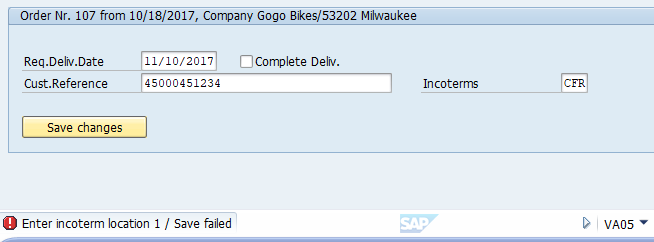
This means that we also need to include "Incoterms Location 1" as an updatable field in our application.
Whether a location is required, however, depends on the Incoterms customizing in the SAP system: for some Incoterms it is mandatory, for others it is optional.
A check in your own application would therefore have to take the specific Incoterms value into account and reproduce the SAP customizing.
In such cases, it is usually the better approach to rely on the SAP check and display the SAP error message to the user, provided it is sufficiently clear.
Warnings
When saving, SAP transactions may first display one or more warning messages, which the user can skip by pressing Enter.
However, the user also has the option of canceling the save because of a warning.
This kind of interaction is not provided for in the OData protocol: OData is stateless, and the server application has no way of asking
the user a question and then continuing the processing based on the user's response.
In the GuiXT script, we receive the warning after the update and can display it:
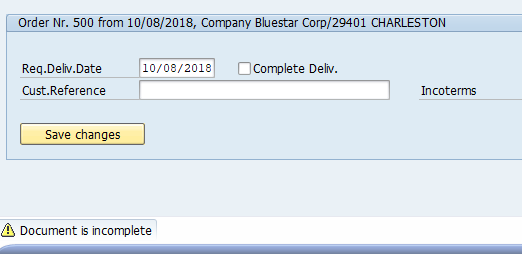
The update itself, however, has already been carried out and may not be reversible.
For draft-enabled services, SAP provides a mechanism that closes this gap: changes are first written to a draft, the "Prepare" action runs
the validations on the draft and returns errors and warnings, and only the "Activate" action transfers the draft to the active document.
The user can therefore see the warnings before anything is actually saved.
Draft handling is mainly used in SAP Fiori UI services, and many released APIs are not draft-enabled; you can check the service metadata to see whether drafts are supported.
For details, see SAP's description of the
draft concept.
If SAP offers a "check" function in addition to the update, which does not change anything but returns errors and warnings, we can call it before saving.
Without such a function, one workaround is to reproduce the SAP logic that leads to the warning in our application; in this example, we would check
before saving that the customer reference is not empty.
If that is too complex, another option, which can be useful beyond the topic of warnings, is to add an "Undo" function to our application:
we store the original values and, when the user clicks an "Undo" button, restore them in the SAP system via an OData update.
Depending on the object and the type of change, however, there is no guarantee that such an undo is possible, or, if it is possible in principle,
that it can be done simply by writing back the old values.
Also note that an undo does not erase the original change: the change documents in the SAP system record both the change and its reversal,
which may be relevant where audit requirements apply.
In many practical cases, though, an "Undo" function should be a good way to offer the user an alternative when a warning message appears.
Error messages
Error messages returned by the service can easily be shown to the user via the "message" parameter of the guinet.odata.update function. Example:
Displaying the SAP message
// SAP message
CreateStructure V[msg] type message

// update sales order
CallVB guinet.odata.update _
  service:=... _
  ...
  message:="msg"

// display SAP message
Message "&V[msg.message]" type="&V[msg.type]" -statusline
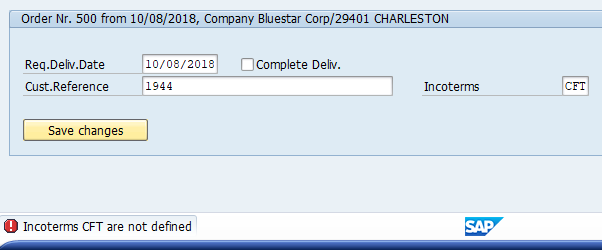
In some cases, the SAP message is unclear or not very user-friendly, so you may want to replace it with a better one. A typical example is an update conflict: the sales order was changed by another user or process after our application read it. The OData service detects this through the ETag that was read along with the data, and rejects the update to prevent the other change from being overwritten. The v4 service returns the following message:
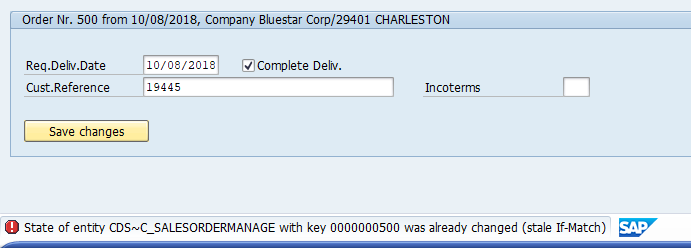
The message text "State of entity CDS~SALESORDERMANAGE with key 0000000500 was already changed (stale If-Match)" sounds rather technical. The v2 service returns a more understandable text:
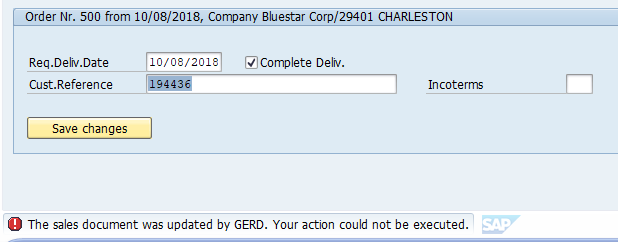
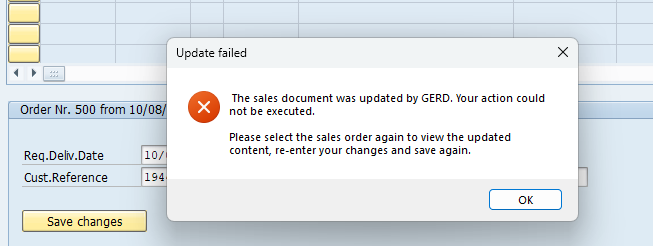
Even the text "The sales document was updated by ..." can be improved, however, by adding a recommendation on how the user should handle the situation. Update conflicts are returned as error messages, just like validation errors such as a missing Incoterms location, so the message type alone does not identify the conflict. In the following example, we therefore check the beginning of the message text and display a specific message for update conflicts. Note that the message text depends on the logon language; if your users log on in different languages, the check needs to cover the corresponding texts.
Replacing the SAP message
// SAP message
CreateStructure V[msg] type message code

// update sales order
CallVB guinet.odata.update _
  service:=... _
  ...
  message:="msg"

// check for update conflict (English logon)
Set V[temp] "&V[msg.message]" _
  regex="^The sales document was updated by"

if Q[ok]
  Message "&V[msg.message]" && _
    "\n\nPlease select the sales order again" && _
    " to view the updated content," && _
    " re-enter your changes and save again." _
    type="E" _
    title="Update failed"
else

  // display SAP message
  Message "&V[msg.message]" type="&V[msg.type]" -statusline

endif
Concurrent updates
SAP OData services use optimistic concurrency control based on so-called "ETags" (entity tags). No lock is held between reading and updating an object. Instead, each object version carries an ETag, which is typically derived from the object's last change time stamp or, in other cases, from a hash code of the object's data.
When you update an object, you pass the ETag that you received with a previous OData.Read call. If another user has changed the object in the meantime, its ETag no longer matches, and the SAP system rejects your update (HTTP status 412 "Precondition Failed"). You then need to read the object again, check the current data, and repeat the update if appropriate.
The GuiXT OData API automatically stores the ETag received from an OData.Read call and includes it in the following OData.Update request. This allows you to combine OData.Read and OData.Update without handling ETags explicitly in your script. The stored ETag is replaced only by successful requests; after a failed update it remains unchanged, so further updates fail as well until you read the object again.
If no ETag is available, the update is sent without a concurrency check (If-Match: *),
i.e. it may overwrite changes made by other users.
When you work with several services or objects, we recommend handling the ETags explicitly with the "etag:=" parameter. Otherwise, a later Read call replaces the stored ETag that you still need for an update of a previously read object. In OData.Read, "etag:=" names the variable that receives the ETag; in OData.Update, "etag:=" passes the ETag value to be used.
Since an update also changes the object's ETag, you cannot reuse the original ETag for a second update of the same object. Use the "newEtag:=" parameter of OData.Update to obtain the new ETag, which you then pass to the next update.
Here is how our sample application uses the ETag mechanism to update a sales order:
Reading the sales order...
CallVB guinet.odata.read _
service:=... _
...
etag:="so_etag" _
result:="SalesOrder"
Updating the sales order
...
CallVB guinet.odata.update _
  service:=... _
  ...
  etag:="&V[so_etag]" _
  newEtag:="so_newetag"

// check for errors
if ...    // any error?
  ...
else
  ...
  // use the new ETag for the next update
  Set V[so_etag] "&V[so_newetag]"
endif
Asynchronous update processing
SAP applications often save changes in an asynchronous update task. A read request issued immediately after a successful update may therefore still return the previous data, typically for a few seconds, under heavy system load possibly longer. The same applies to create and delete operations: a read request issued directly afterwards may not yet find a newly created object, or may still return a deleted one.
Whether a particular OData service waits for the update task to finish before it returns to the caller depends on the implementation of that service, and is usually not documented or guaranteed by SAP. The separate tip “Detecting the update mode” explains how to determine whether a particular service updates data synchronously or asynchronously.
Our general recommendation is to read an object immediately after an update only when your application really needs it. If the update request returned no error, you can generally rely on the data being changed in the SAP system.
However, you may want to display data that you did not change yourself but that the SAP application recalculates as a consequence of your change. For example, you change the quantity of a sales order item and want to display the new net value of the order. This may require a complex pricing procedure, including customer or quantity dependent discounts, so you depend on the result computed by the SAP application. In such cases you need a reliable way to read the updated object.
The following procedure is somewhat laborious but reliable:
- When reading the object, store its ETag in a separate variable, e.g. V[etag_read].
- Perform the update, passing V[etag_read] as ETag.
- If the update was successful, read the object again and store the new ETag in a second variable, e.g. V[etag_read2]. If V[etag_read2] differs from V[etag_read], you have received a current state of the object that contains your update, or an even newer state.
- As long as V[etag_read2] equals V[etag_read], repeat the read. Use the "delayMs:=" parameter of OData.Read to wait a short time, e.g. 500 milliseconds, before each repeated call.
- Limit the number of repetitions and end with an error message when the limit is reached. Choose the limit so that the total waiting time covers the usual update delay of your system, e.g. 30 attempts with 500 milliseconds each (15 seconds).
The limit in step 5 is essential. If the SAP update task terminates with an error, the update request itself still reports success, but the data is never changed and the read always returns the old ETag. Without a limit, your script would loop endlessly. The limit is also reached if your update did not change the ETag at all, for example when all values you sent were identical to the current ones and the service derives its ETag from the object data. For this reason, we recommend detecting the "no changes" case in your script before calling OData.Update, as implemented in our sample application.
Download link for the demo application:
sales_document_odata_demo.zip
Components InputAssistant + GuiXT Controls