Purpose
Detect the update mode (synchronous or asynchronous update) of a given OData service
With a simple test in a development or sandbox system you can find out whether a particular SAP OData service returns before or after the SAP update task has written the data. The test needs no knowledge of the service's ABAP code and works for any service.
Background
Most SAP applications do not write their changes to the database directly. They register update function modules and trigger them with COMMIT WORK. An update work process then executes these modules asynchronously. There are three variants that matter for the caller:
-
COMMIT WORK: the caller continues immediately, while the update task runs in parallel.
-
COMMIT WORK AND WAIT: the caller waits until the high-priority (V1) update modules have finished.
-
Local update (SET UPDATE TASK LOCAL): the update modules run in the caller's own work process, so the call returns only after the data has been written. This appears to be a common approach when implementing OData update services.
Low-priority (V2) update modules, for example statistics updates, always run later, even with COMMIT WORK AND WAIT.
For an application that calls OData.Update, this decides whether a read immediately afterwards returns the changed data. SAP generally does not document which variant a service uses, and different parts of one business process can behave differently. See the OData.Update documentation for the general recommendations.
Why SM14 is not suitable for the test
An obvious idea is to deactivate updating in transaction SM14 and see whether the OData request returns. This does not work. While updating is deactivated, the SAP system suspends every program that tries to create an update request, so the request waits in any case.
You can see this with transaction VA02: saving a sales order also hangs until updating is reactivated. The test therefore cannot distinguish COMMIT WORK from COMMIT WORK AND WAIT. It can even suggest that a service waits for the update when the data has in fact already been written (see the example below).
Test setup: blocking the update work processes
Instead of stopping updates, you keep all update work processes busy for a defined time. New update requests can still be created, but they wait for a free update process. A service that uses COMMIT WORK returns immediately, while a service that uses COMMIT WORK AND WAIT hangs until the blockade ends.
You need two small objects. First, an update function module that keeps its work process busy for a given number of seconds. A WAIT UP TO statement is not suitable here: in our test the work process was not blocked during the wait. The module therefore uses a loop that checks the elapsed time. The loop uses CPU, which is acceptable in a test system for a short time. Create it in SE37 with processing type "Update module" and "Start immediately" (V1). Import parameters of update modules must be passed by value.
FUNCTION z_update_blocker.
*"----------------------------------------------------------------------
*"*"Update function module:
*"
*"*"Local interface:
*"  IMPORTING
*"     VALUE(SEC) TYPE  I DEFAULT 60
*"----------------------------------------------------------------------

  DATA: lv_start TYPE timestampl,
        lv_now   TYPE timestampl.

  IF sec LE 0.
    sec = 60.
  ENDIF.

  GET TIME STAMP FIELD lv_start.
  DO.
    GET TIME STAMP FIELD lv_now.
    IF cl_abap_tstmp=>subtract( tstmp1 = lv_now tstmp2 = lv_start ) >= sec.
      EXIT.
    ENDIF.
  ENDDO.

ENDFUNCTION.
Second, a report that calls this module once per update work process, each time in its own LUW:
REPORT z_block_update_wps.

PARAMETERS: p_procs TYPE i DEFAULT 2,     " number of update work processes
            p_secs  TYPE i DEFAULT 60.    " blocking time in seconds

DO p_procs TIMES.
  CALL FUNCTION 'Z_UPDATE_BLOCKER' IN UPDATE TASK
    EXPORTING
      sec = p_secs.
  COMMIT WORK.   " without AND WAIT, so that the report itself does not wait
ENDDO.
Set p_procs to the number of UPD work processes shown in SM50. A higher value does no harm: the additional requests are queued and simply extend the blockade.
In a system with several application servers, update requests can be dispatched to other servers. In this case you have to block the update work processes of all servers.
Control checks
Before you test an OData service, make sure that the blockade works as intended. Otherwise a result such as "the service returns immediately" has no meaning.
-
Processes are busy: start the report and check in SM50 that all UPD work processes are running with the blocker module. If they show "Waiting" during the blocking time, the blockade does not work.
-
Update requests can still be created: change a sales order in VA02 during the blockade. Saving must return immediately, and SM13 must show the update request with status "Initial". SM12 shows the lock entry of the order with UPD count 1 until the blockade ends.
-
A waiting caller really waits: a small test report that calls an update module with COMMIT WORK AND WAIT must hang until the blockade ends.
Running the test and evaluating the results
Start the blocker report, call the OData service from your application during the blocking time, and note whether the call returns immediately. Then read the changed object again. While the blockade is still active, check the following:
-
SM13: select status "All" and user "*", since the OData requests may run under a different user than your dialog user. Successfully processed update requests are deleted immediately, so you will only see them during the blockade.
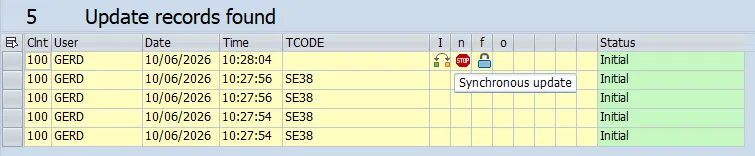
A double-click shows the update modules with their execution mode (V1/V2) and status. -
SM12: a lock entry with UPD count 1 that remains after the call has returned indicates that the object itself is updated asynchronously.
-
ST05 (optional): a SQL trace of the OData request shows whether the request writes update requests (tables VBHDR, VBMOD, VBDATA) or changes the application tables directly.
| Observation | Interpretation |
|---|---|
| Call hangs until the blockade ends | The service waits for its V1 update (COMMIT WORK AND WAIT). |
| Call returns immediately, changed data not yet visible | The service uses COMMIT WORK. A read directly after the update can return old data. |
| Call returns immediately, changed data already visible | The object is written in the request itself (local update or direct database changes). Check SM13 for further update requests of dependent processes. |
Example: changing a sales order
In our S/4HANA test system, the same sales order change behaves differently in VA02 and in the OData sales order API. The update work processes were blocked for 60 seconds in both tests.
| VA02 | OData sales order API | |
|---|---|---|
| Call returns | Immediately | Immediately |
| Changed order visible | After the blockade (about 60 s) | Immediately |
| Lock in SM12 | Held with UPD count 1 until the blockade ends | No lock |
| Update request in SM13 | Sales order update | Only FINS_PRED_ACCNOTIF_UPDATE (V1), created by a CL_FINS_PRED_ORCHESTRAT... class |
| With updating deactivated in SM14 | Hangs | Hangs, although the order has already been changed |
VA02 writes the sales order through the asynchronous update task. The OData service writes the order within the request itself. The only update request it creates belongs to Predictive Accounting, which creates predictive journal entries for sales orders. This V1 update runs asynchronously, and the OData service does not wait for it.
This also explains the misleading SM14 result: the OData request hangs because it cannot create the Predictive Accounting update request. The sales order data is already saved at this point. In a system without active Predictive Accounting, this update request would not exist at all.
Conclusions
The result of the test applies only to the tested service, release and system configuration. The example shows two reasons for this: the same business object is written differently depending on the access path, and additional processes such as Predictive Accounting depend on customizing.
For applications that use OData.Update, this means:
-
If the update request returned no error, you can generally rely on the data being changed in the SAP system.
-
Read the object immediately after an update only when your application really needs the result.
-
If it does, distinguish between the object itself and dependent data in other areas. The test tells you which of them are available immediately and which are updated asynchronously.
-
Where data can still be outdated, compare the ETag of a subsequent read with the ETag before the update and repeat the read after a short delay, as described in the OData.Update documentation.