Purpose
Use the "expand" feature of the OData interface
WIth the "expand" parameter in "OData.Read" you can retrieve related entities (navigation properties) together with the main entity in a single OData call, instead of requiring separate requests for each related entity set. For example, expanding to_MaintenanceOrderOperation on a maintenance order returns the order together with all its operations in one response.
For each navigation property, the result list must contain a matching GuiXT table variable; only the columns defined in that table variable are read from the corresponding OData entity.
In "OData.Update" and "OData.Create" the analogous mechanism can be used to update or create related entities. In these calls the API parameter is called "navigation".
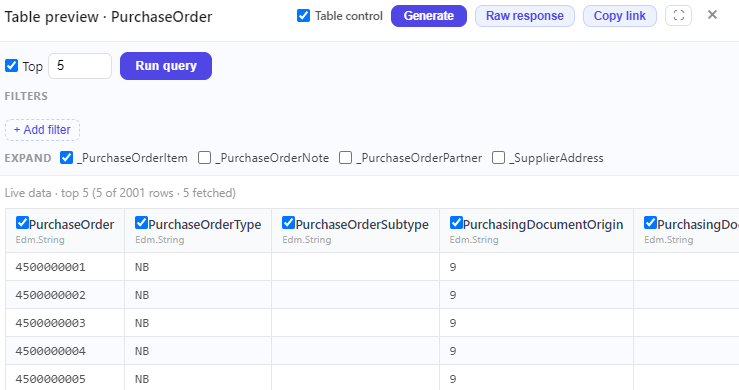
As a first example, we read a single purchase order. Use the ODataTool of the Script editor Pro to find the right service, to preview the live data, select the eight columns and generate the structure and table variables.
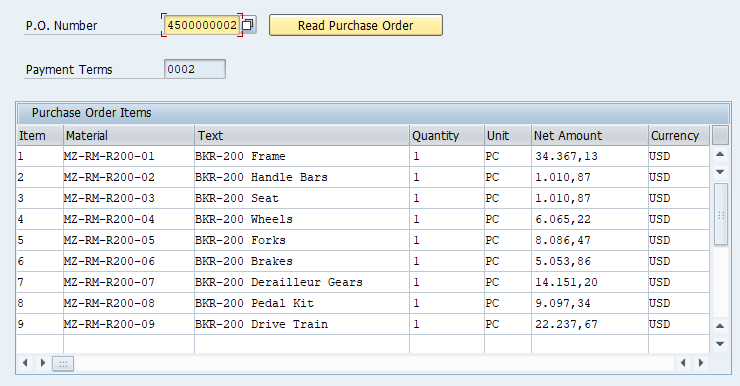
We use a structure variable for the purchase order header and a table variable for the items. Then we execute the "OData.Read" and display the result:
InputField	(1,4)	"P.O. Number"	(1,24)	_
       size=10	name="ordernumber"	-numerical  techName="EKKO-EBELN"
PushButton	(1,39)	"Read Purchase Order" _
        process="read_purchase_order.txt" size=(1,24)
  Using ordernumber = [ordernumber]


// P.O. already read ?
if V[PurchaseOrderItems.rowcount>0]

  InputField	(3,4)	"Payment Terms"	(3,24)	size=8 _
    name="PurchaseOrderHeader.PaymentTerms"	-readOnly

  Table (5,3) (17,104) name="PurchaseOrderItems" _
    title="Purchase Order Items"
  Column "Item" size=6 name="PurchaseOrderItem"
  Column "Material" size=18 name="Material"
  Column "Text" size=30 name="PurchaseOrderItemText"
  Column "Quantity" size=10 name="OrderQuantity"
  Column "Unit" size=6 name="PurchaseOrderQuantityUnit"
  Column "Net Amount" size=16 name="NetAmount"
  Column "Currency" size=8 name="DocumentCurrency"

endif
Parameter ordernumber

CreateStructure V[PurchaseOrderHeader] _
  PurchaseOrder _
  PaymentTerms

CreateTable V[PurchaseOrderItems] _
  PurchaseOrder _
  PurchaseOrderItem _
  Material _
  PurchaseOrderItemText _
  OrderQuantity _
  PurchaseOrderQuantityUnit _
  NetAmount _
  DocumentCurrency

// P.O. number as key
CreateStructure V[myKey] PurchaseOrder
Set V[myKey.PurchaseOrder] "&U[ordernumber]"

CallVB guinet.odata.read _
  service:="sap/opu/odata4/iwbep/all/srvd_a2x/sap/" && _
      "api_purchaseorder_2/0001/PurchaseOrder" _
  key:="myKey" _
  expand:="_PurchaseOrderItem" _
  result:="PurchaseOrderHeader,PurchaseOrderItems"
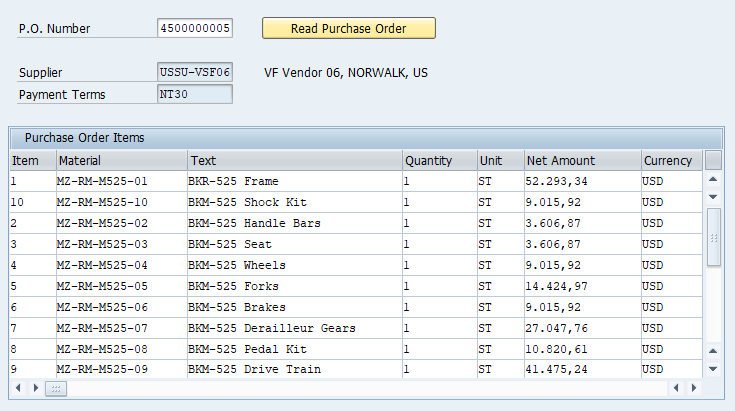
We now want add the supplier's number, name, city and country. This is another "expand" entity "PurchaseOrderSupplierAddress". We add it to our "OData.Read" and display the supplier info in the GuiXT Script:
InputField	(1,4)	"P.O. Number"	(1,24)	_
  size=10	name="ordernumber"	-numerical  techName="EKKO-EBELN"

PushButton	(1,39)	"Read Purchase Order" _
  process="read_purchase_order.txt" size=(1,24)
  Using ordernumber = [ordernumber]


// P.O. already read ?
if V[PurchaseOrderItems.rowcount>0]

  // Supplier number
  InputField	(3,4)	"Supplier"	(3,24)	size=10 _
    name="PurchaseOrderHeader.Supplier"	-readOnly

  // Supplier Name, City, Country
  Text (3,39) "&V[SupplierAddress.AddresseeFullName], " && _
    "&V[SupplierAddress.CityName], " && _
    "&V[SupplierAddress.Country]"

  // Payment terms
  InputField	(4,4)	"Payment Terms"	(4,24)	size=10 _
    name="PurchaseOrderHeader.PaymentTerms"	-readOnly

  // Items
  Table (6,3) (18,104) name="PurchaseOrderItems" _
    title="Purchase Order Items"
  Column "Item" size=6 name="PurchaseOrderItem"
  Column "Material" size=18 name="Material"
  Column "Text" size=30 name="PurchaseOrderItemText"
  Column "Quantity" size=10 name="OrderQuantity"
  Column "Unit" size=6 name="PurchaseOrderQuantityUnit"
  Column "Net Amount" size=16 name="NetAmount"
  Column "Currency" size=8 name="DocumentCurrency"

endif
Parameter ordernumber

CreateStructure V[PurchaseOrderHeader] _
  PurchaseOrder _
  Supplier _
  SupplierAddressID _
  PaymentTerms

CreateStructure V[SupplierAddress] _
  SupplierAddressID _
  AddresseeFullName _
  CityName _
  Country

CreateTable V[PurchaseOrderItems] _
  PurchaseOrder _
  PurchaseOrderItem _
  Material _
  PurchaseOrderItemText _
  OrderQuantity _
  PurchaseOrderQuantityUnit _
  NetAmount _
  DocumentCurrency

// P.O. number as key
CreateStructure V[myKey] PurchaseOrder
Set V[myKey.PurchaseOrder] "&U[ordernumber]"

CallVB guinet.odata.read _
  service:="sap/opu/odata4/iwbep/all/srvd_a2x/sap/" && _
  "api_purchaseorder_2/0001/PurchaseOrder" _
  key:="myKey" _
  expand:="_PurchaseOrderItem,_SupplierAddress" _
  result:="PurchaseOrderHeader,PurchaseOrderItems,SupplierAddress"
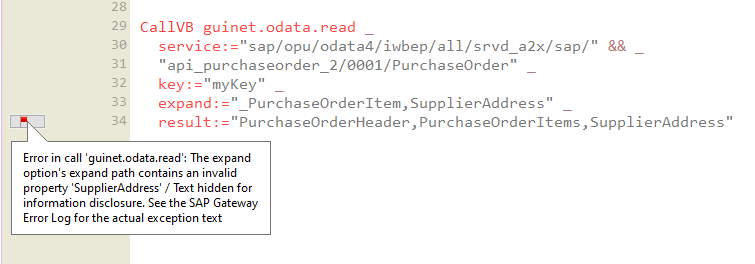
Please observe that the expand property is "_SupplierAddress", starting with an underscore. The name of the corresponding GuiXT structure variable - in this case, "SupplierAddress" -can be chosen freely.
If there are errors, such as an invalid "expand" property, the Script Editor Pro displays the SAP error message for the service request:
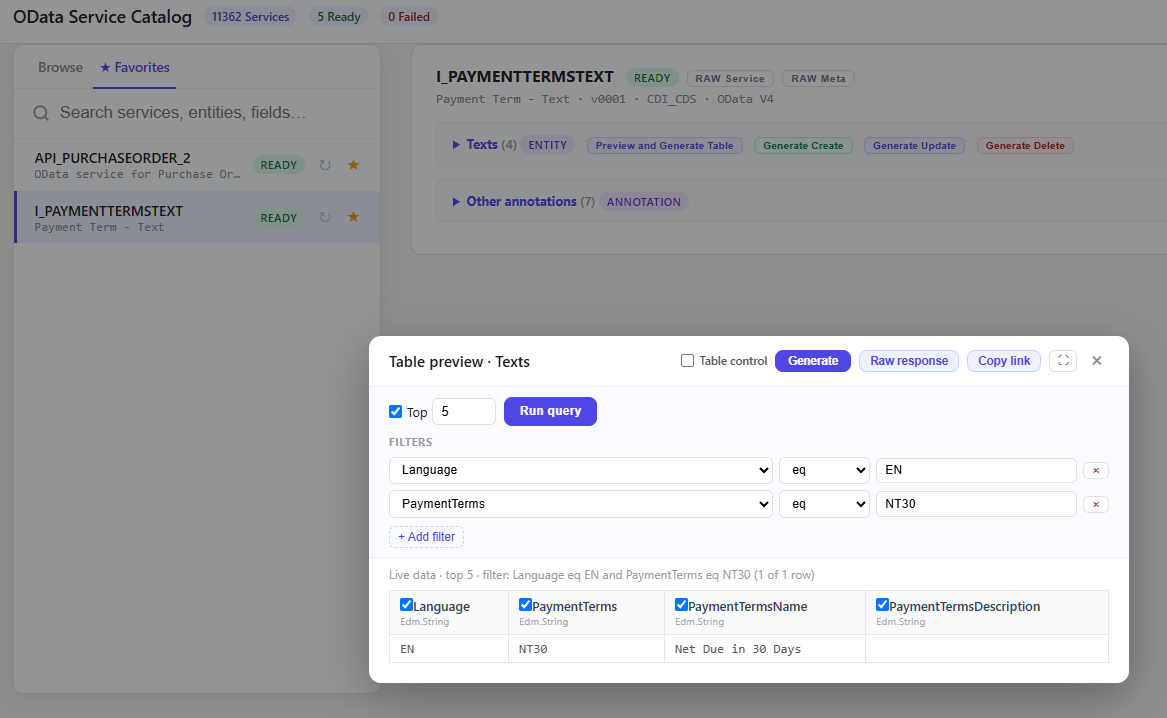
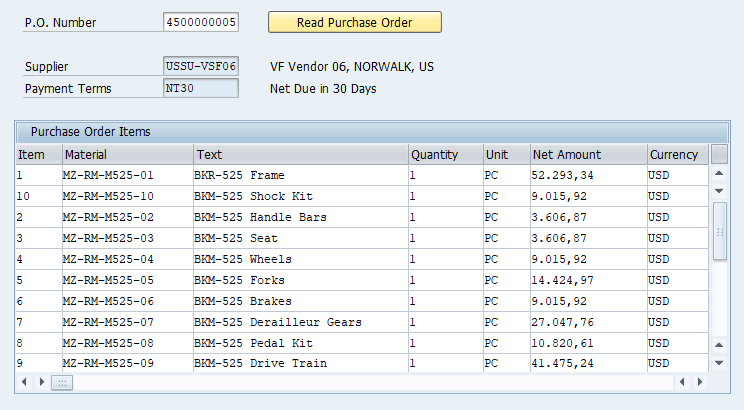
For the payment terms, in the example "NT30," the API_PURCHASEORDER_2 service does not provide any descriptive text. However, we can use another OData service - I_PAYMENTTERMSTEXT - to retrieve the text. The best way to test this is to run a quick test in the OData Tool of Script Editor Pro and then have it generate the structure and access methods:
Parameter ordernumber

CreateStructure V[PurchaseOrderHeader] _
  PurchaseOrder _
  PaymentTerms

CreateTable V[PurchaseOrderItems] _
  PurchaseOrder _
  PurchaseOrderItem _
  Material _
  PurchaseOrderItemText _
  OrderQuantity _
  PurchaseOrderQuantityUnit _
  NetAmount _
  DocumentCurrency

// P.O. number as key
CreateStructure V[myKey] PurchaseOrder
Set V[myKey.PurchaseOrder] "&U[ordernumber]"

CallVB guinet.odata.read _
  service:="sap/opu/odata4/iwbep/all/srvd_a2x/sap/" && _
      "api_purchaseorder_2/0001/PurchaseOrder" _
  key:="myKey" _
  expand:="_PurchaseOrderItem" _
  result:="PurchaseOrderHeader,PurchaseOrderItems"
We now want add the supplier's number, name, city and country. This is another "expand" entity "PurchaseOrderSupplierAddress". We add it to our "OData.Read" and display the supplier info in the GuiXT Script:
InputField	(1,4)	"P.O. Number"	(1,24)	_
  size=10	name="ordernumber"	-numerical  techName="EKKO-EBELN"

PushButton	(1,39)	"Read Purchase Order" _
  process="read_purchase_order.txt" size=(1,24)
  Using ordernumber = [ordernumber]


// P.O. already read ?
if V[PurchaseOrderItems.rowcount>0]

  // Supplier number
  InputField	(3,4)	"Supplier"	(3,24)	size=10 _
    name="PurchaseOrderHeader.Supplier"	-readOnly

  // Supplier Name, City, Country
  Text (3,39) "&V[SupplierAddress.AddresseeFullName], " && _
    "&V[SupplierAddress.CityName], " && _
    "&V[SupplierAddress.Country]"

  // Payment terms
  InputField	(4,4)	"Payment Terms"	(4,24)	size=10 _
    name="PurchaseOrderHeader.PaymentTerms"	-readOnly

  // Items
  Table (6,3) (18,104) name="PurchaseOrderItems" _
    title="Purchase Order Items"
  Column "Item" size=6 name="PurchaseOrderItem"
  Column "Material" size=18 name="Material"
  Column "Text" size=30 name="PurchaseOrderItemText"
  Column "Quantity" size=10 name="OrderQuantity"
  Column "Unit" size=6 name="PurchaseOrderQuantityUnit"
  Column "Net Amount" size=16 name="NetAmount"
  Column "Currency" size=8 name="DocumentCurrency"

endif
// read payment terms
CreateStructure V[PaymentTermsText] _
  PaymentTerms _
  PaymentTermsName

CallVB guinet.odata.read _
  service:="sap/opu/odata4/iwbep/all/cdi_cds/sap" && _
              "/i_paymenttermstext/0001/Texts" _
  filter:="Language eq '&V[_language2]' and " && _
            "PaymentTerms eq '&V[PurchaseOrderHeader.PaymentTerms]'" _
  result:="PaymentTermsText"
//  // Payment terms
  InputField	(4,4)	"Payment Terms"	(4,24)	size=10 _
    name="PurchaseOrderHeader.PaymentTerms"	-readOnly

  Text (4,39) "&V[PaymentTermsText.PaymentTermsName]"
Components InputAssistant + GuiXT Controls