1. Find suitable OData services
Start by identifying which OData services provide the data you need. Useful sources include:
the OData service catalog in the GuiXT Script Editor Pro, which lists the services available on your SAP system,
the SAP catalog (SAP API Business Hub / Fiori Apps Reference Library),
a web search, or an AI assistant, for example by describing the business object or transaction you are interested in.
2. Check the service output
Open the candidate service in the Script Editor Pro catalog and look at the data it actually returns. This lets you quickly check whether the entity sets and fields match your requirements before investing any development effort.
3. Generate structures and tables
If the service fits, let the Script Editor Pro generate the corresponding structure and table definitions for you. Restrict the columns to those you really need. You can either select them in the Script Editor Pro during generation, or remove unneeded fields from the generated script afterwards. Keeping the column list small avoids reading and transferring data unnecessarily and noticeably improves performance.
We also recommend letting the Script Editor Pro generate the table display. This gives you a working output right away, which you can then adapt.
4. Continue from there
Use the generated code as the basis for your own script and extend it as required, e.g. with filters, selection parameters or your own user interface. The Tips & Tricks section contains ready-made examples that often make a good starting point.
To illustrate this approach, the following sections walk through an example (Business Partner Contacts).
Our Target Application
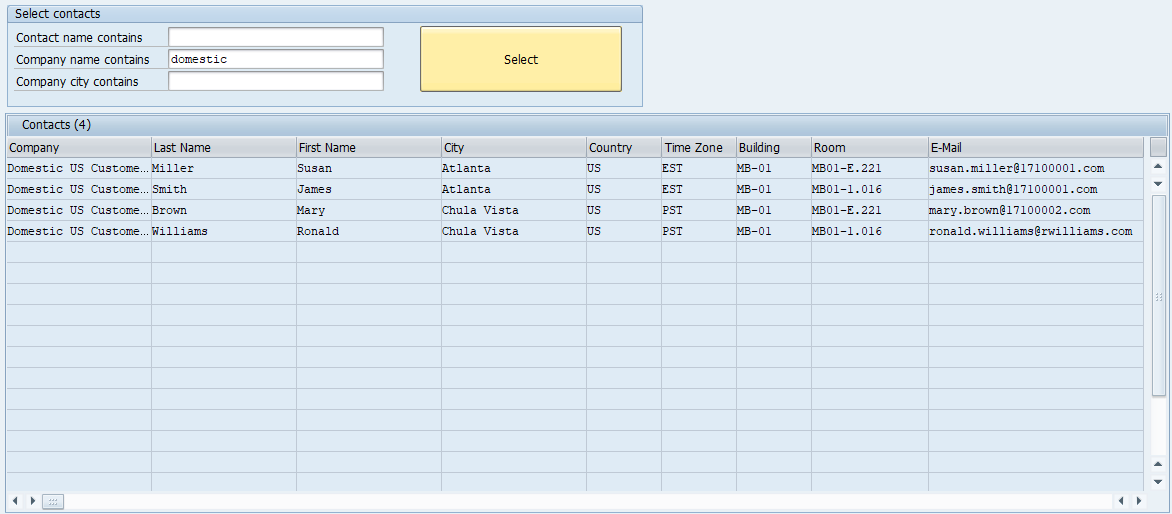
The user searches for contacts by first name, last name, company name and city. The application then displays contact details such as room number and and email address.
The complexity of this example is mainly due to the SAP data model, where the information about a contact person is spread across several entities, and to the limited query options of OData, which does not support joins across entities. Combining OData with CallSQL compensates for this: OData provides the data through released, authorization-checked interfaces, and SQL combines the results locally into exactly the view the application needs.Finding suitable OData services to select and display the contact data
This step is often not straightforward. When accessing SAP tables directly, for example with the /guixt/dbselect module, it is sufficient to locate the tables that contain the required information.
Once you know the table and column names, you can retrieve the data with a single SQL statement, since SQL supports any number of joins, subqueries, grouping and selection conditions.
With OData, on the other hand, finding a service that provides exactly the required view of the data often requires some searching, and different OData services cannot be combined using joins or subqueries.
One advantage of the OData approach, however, is that authorization checks are already built in, and some services internally combine data from several tables.
The OData services whose names begin with “UI_”, which SAP uses for its own SAP Fiori apps, usually provide fairly comprehensive access to the data.
However, SAP has not released these services for use in customer or third-party applications, so their interfaces may change at any time.
For example, the service UI_CUSTOMER_CONTACT_MANAGE, used by the corresponding SAP Fiori app, would provide most of the required data for our app in a single entity, but it is not released for external use.
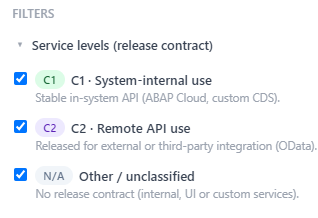
In the OData catalog of Script Editor Pro, you can filter the services by release contract:
Services released under release contract C2 (“Use as Remote API”) are a different matter.
For these, SAP guarantees a stable interface: they are only developed further in a compatible way, and if they are to be replaced, they are first marked as deprecated with a transition period and a named successor.
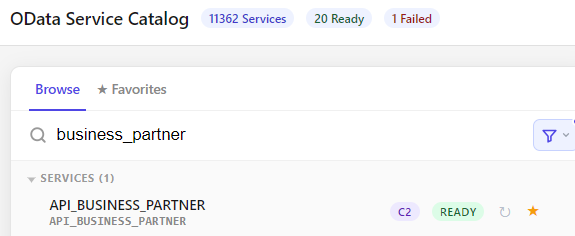
The release contract is displayed in the OData catalog of Script Editor Pro.
We recommend using released services in your own applications, even if this means a somewhat higher implementation effort.
Objects released under contract C1, typically CDS views, are not intended for direct external access, but they can be used as a stable basis for your own OData services.
To read the contacts, we use the API_BUSINESS_PARTNER service, which is released under contract C2. Services whose names begin with “API_” are generally SAP’s released public APIs.
// ===================================================================
// Select contacts via OData
//
// The contact data (company name, city, contact name) are spread
// over several entities of the service API_BUSINESS_PARTNER:
//
//   A_BusinessPartnerAddress  company name and city
//   A_BusinessPartnerContact  relationship company -> contact person
//   A_BusinessPartner         first and last name of the person
//   A_BPContactToAddress      contact data (building, room, e-mail ...)
//   A_AddressEmailAddress     email addresses
//
// OData V2 cannot join entities or filter across navigations, so we
// read the entities step by step and pass the keys found in one step
// as a filter to the next step. The final result is combined locally
// with an SQL JOIN (CallSQL).
// ===================================================================

// reset data from a previous search
Clear V[Companies]
Clear V[Contacts]
Clear V[companylist]
Clear V[contactlist]


// -------------------------------------------------------------------
// Step 1: determine the companies
// Only required if company name or city has been specified.
// -------------------------------------------------------------------
if V[filter_company] or V[filter_city]

  CreateTable V[Companies] _
    BusinessPartner

  // Company addresses have no person number. Depending on the
  // underlying CDS view, the empty field is either '' or NULL in the
  // database; both appear as "" in the output, so we check both.
  // An empty search string in contains() matches all values.
  CallVB guinet.odata.read _
    service:="sap/opu/odata/sap/API_BUSINESS_PARTNER/" && _
    "A_BusinessPartnerAddress" _
    filter:="(Person eq null or Person eq '') and " && _
    "contains(CityName,'&V[filter_city]') and " && _
    "contains(FullName,'&V[filter_company]')" _
    result:="Companies"

  // no company found?
  if V[Companies.rowcount=0]
    Message "W: No matching company found" -statusline
    Return
  endif

  // Build the OData filter for step 2 from the company numbers:
  //  BusinessPartnerCompany eq '1000219' or BusinessPartnerCompany...
  // group_concat() joins the values of all rows into one string.
  CallSQL V[companylist] = _
    "SELECT group_concat('BusinessPartnerCompany eq ''' || " && _
    "BusinessPartner || '''', ' or ') FROM V[Companies]"


  // -----------------------------------------------------------------
  // Step 2: read the contact persons of these companies
  // -----------------------------------------------------------------
  CreateTable V[CompanyContacts] BusinessPartnerPerson

  // With many companies the filter can get very long. Inside a $batch
  // request, the request URL is part of the POST body, so URL length
  // limits (IIS, ICM, proxies) do not apply.
  CallVB guinet.odata.createbatch _
    service:="sap/opu/odata/sap/API_BUSINESS_PARTNER"

  CallVB guinet.odata.read _
    service:="sap/opu/odata/sap/API_BUSINESS_PARTNER/" && _
    "A_BusinessPartnerContact" _
    filter:="RelationshipCategory eq 'BUR001' and (&V[companylist])" _
    result:="CompanyContacts"

  // send the batch, distribute the results to the tables, clean up
  CallVB guinet.odata.requestBatch
  CallVB guinet.odata.fetchAllBatchResults
  CallVB guinet.odata.deleteBatch

  if V[CompanyContacts.rowcount=0]
    Message "W: No contacts found for the selected companies" -statusline
    Return
  endif

  // Build the filter for step 3 from the person numbers:
  //  BusinessPartner eq '9000000024' or BusinessPartner...
  CallSQL V[contactlist] = _
    "SELECT group_concat('BusinessPartner eq ''' || " && _
    " BusinessPartnerPerson || '''', ' or ') FROM V[CompanyContacts]"

  // append it to the name filter of step 3
  Set V[contactlist] "and (&V[contactlist])"

endif


// -------------------------------------------------------------------
// Step 3: read the names of the contact persons
// Without company/city this is the first step, and only the name
// filter applies.
// -------------------------------------------------------------------
CreateTable V[ContactNames] _
  BusinessPartner _
  PersonNumber _
  FirstName _
  LastName

// BusinessPartnerCategory '1' = person, '2' = organization
CallVB guinet.odata.createbatch _
  service:="sap/opu/odata/sap/API_BUSINESS_PARTNER"

CallVB guinet.odata.read _
  service:="sap/opu/odata/sap/API_BUSINESS_PARTNER/" && _
  "A_BusinessPartner" _
  filter:="BusinessPartnerCategory eq '1' and " && _
  "contains(BusinessPartnerFullName,'&V[filter_contact]') " && _
  "&V[contactlist]" _
  top:="500" _
  result:="ContactNames"

CallVB guinet.odata.requestBatch
CallVB guinet.odata.fetchAllBatchResults
CallVB guinet.odata.deleteBatch

// no matching person?
if V[ContactNames.rowcount=0]
  Message "W: No matching contact found" -statusline
  Return
endif

// Build the filter for step 4:
//   BusinessPartnerPerson eq '9000000024' or ...
CallSQL V[contactlist] = _
  "SELECT group_concat('BusinessPartnerPerson eq ''' || " && _
  " BusinessPartner || '''', ' or ') FROM V[ContactNames]"


// -------------------------------------------------------------------
// Step 4: read the contact data
// A_BPContactToAddress holds the address of the contact person within
// the company (building, room, ...).
// The e-mail addresses are read separately
// -------------------------------------------------------------------
CreateTable V[ContactInfo] _
  BusinessPartnerCompany _
  BusinessPartnerPerson _
  AddressID _
  FullName _
  CityName _
  Country _
  AddressTimeZone _
  ContactPersonBuilding _
  RoomNumber

CallSQL V[emailfilter] = _
  "SELECT group_concat('Person eq ''' || PersonNumber || " && _
  " '''', ' or ') FROM V[ContactNames]"

CreateTable V[ContactEmail] _
  AddressID _
  Person _
  EmailAddress _
  IsDefaultEmailAddress(Boolean)

CreateTable V[ContactRelations] _
  BusinessPartnerCompany _
  BusinessPartnerPerson

CallVB guinet.odata.createbatch _
  service:="sap/opu/odata/sap/API_BUSINESS_PARTNER"

CallVB guinet.odata.read _
  service:="sap/opu/odata/sap/API_BUSINESS_PARTNER/" && _
  "A_BPContactToAddress" _
  filter:="&V[contactlist]" _
  result:="ContactInfo"


// personal e-mail addresses of the contact persons
// ($expand=to_EmailAddress above would only return the general
//  e-mail address of the company address)
CallVB guinet.odata.read _
  service:="sap/opu/odata/sap/API_BUSINESS_PARTNER/" && _
  "A_AddressEmailAddress" _
  filter:="&V[emailfilter]" _
  result:="ContactEmail"

// A person can be linked to a company in different ways, e.g. as
// contact person (BUR001) or as employee (BUR010). A_BPContactToAddress
// does not tell us which, so we read the "contact person" relationships
// of the same persons in the same batch request.
CallVB guinet.odata.read _
  service:="sap/opu/odata/sap/API_BUSINESS_PARTNER/" && _
                "A_BusinessPartnerContact" _
  filter:="RelationshipCategory eq 'BUR001' and (&V[contactlist])" _
  result:="ContactRelations"


CallVB guinet.odata.requestBatch
CallVB guinet.odata.fetchAllBatchResults
CallVB guinet.odata.deleteBatch

// keep only company/person pairs with a contact person relationship
CallSQL V[ContactInfo] = _
  "SELECT info.* FROM V[ContactInfo] AS info " && _
  "WHERE EXISTS (SELECT 1 FROM V[ContactRelations] AS rel " && _
  "WHERE rel.BusinessPartnerCompany = info.BusinessPartnerCompany " && _
  "AND rel.BusinessPartnerPerson = info.BusinessPartnerPerson)"

// A person can be a contact person of several companies. Step 4 reads
// all relationships of the selected persons, including companies that
// do not match the company/city search. If a company or city has been
// specified, we keep only the companies found in step 1.
// Without these criteria (search by contact name only), all companies
// of the person are shown.

if V[filter_company] or V[filter_city]
  CallSQL V[ContactInfo] = _
    "SELECT * FROM V[ContactInfo] " && _
    "WHERE BusinessPartnerCompany IN " && _
    " (SELECT BusinessPartner FROM V[Companies])"
endif


// no matching person?
if V[ContactInfo.rowcount=0]
  Message "W: No matching contact found" -statusline
  Return
endif


// -------------------------------------------------------------------
// Step 5: combine everything into the display table
// INNER JOIN: only persons that are actually contact persons
// LEFT JOIN:  contacts without e-mail address are kept
// -------------------------------------------------------------------
CallSQL V[Contacts] = _
  "SELECT name.*, info.*, email.*" && _
  "FROM V[ContactNames] AS name " && _
  "JOIN V[ContactInfo] AS info " && _
  "  ON name.BusinessPartner = info.BusinessPartnerPerson " && _
  "LEFT JOIN V[ContactEmail] AS email " && _
  "  ON email.AddressID = info.AddressID AND " && _
  " email.Person = name.PersonNumber " && _
  "  AND email.IsDefaultEmailAddress = 'X' "

// order by company, last name, first name
Sort V[Contacts] orderBy="FullName,LastName,FirstName"

// scroll the contacts table to the top
Set V[Contacts.stat.firstvisiblerow] 1

Return